How the Alien Alerts Reporting & Emergency Notification System Works
Real-time public safety network • County-first design • Designed to protect lives and document the threat
1. Two Reporting Forms – Choose the Correct One
- Encounters / Abductions Form – For any direct contact with non-human entities, missing time, family threats, memory suppression, or close-proximity events.
- UAP / Craft Sightings Form – For unidentified aerial phenomena, submerged objects, or craft sightings without direct entity contact.
2. Emergency Alert Checkbox – The Most Important Safety Feature
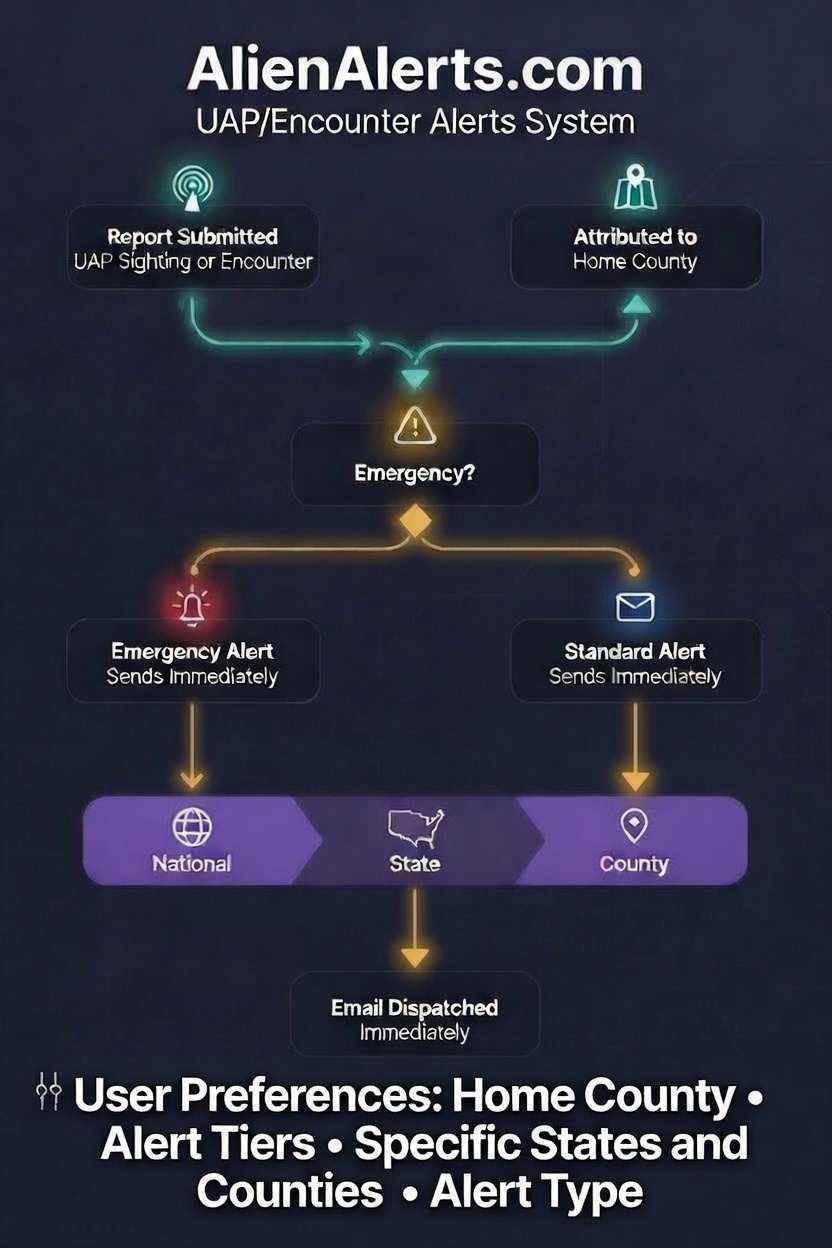
Both forms contain a single Emergency Alert checkbox located near the bottom.
When you should check it:
- You or someone else is in immediate physical danger
- An active abduction or close-contact event is occurring or has just occurred
- You have credible reason to believe a repeat event is imminent
- You observe a grounded craft with entities present and believe public safety is at risk
What happens when the Emergency Alert box is checked:
- An immediate real-time email alert is sent to every registered user in your selected Home County
- A simultaneous National Alert is issued to the entire network
- Level-1 Emergency Moderators are automatically notified for rapid verification and response
Only use the Emergency Alert checkbox when the situation truly requires immediate community awareness. False or exaggerated use will reduce the system’s effectiveness for genuine emergencies.
3. Regular (Non-Emergency) Reports
When the Emergency Alert box is left unchecked, your report is logged into the secure database and becomes visible to approved Investigators, Defenders, Researchers, and Moderators.
4. How Users Receive Alerts
Every registered member can customize their alert preferences in their account settings, including Home County, specific cities, statewide, or national alerts.
5. What Happens After You Submit a Report
- Your report is received and timestamped
- If Emergency Alert was selected → immediate county + national emails go out
- Moderators review for accuracy and public safety value
- De-identified data is added to the secure mapping system
- You receive a confirmation email with your report reference number
Your report is a direct contribution to public safety and human sovereignty.
Submit Your Report Now
Stay vigilant. Stay right-minded. Report promptly.
— Alien Alerts Public Safety Team
Operating under the face-value research framework of The War Against Aliens and How to Win It